

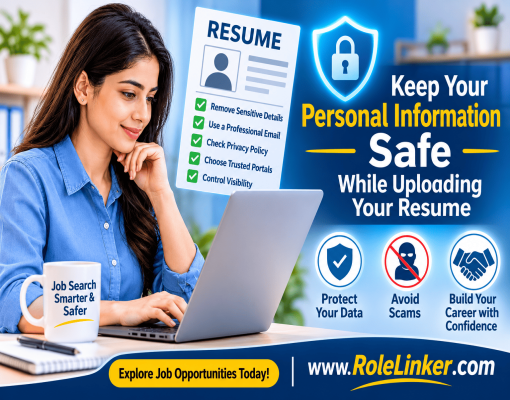
An online resume is an important part of modern job seeking. You can use it to give potential employers an insight into your skills and experience whether you’re a recent graduate, experienced or returning to work. But when sharing your professional information online, privacy and security are also on the agenda.
Numerous job applicants focus on creating a stellar resume without paying attention to details such as personal information that is added to the resume. Information on previous work experience, education, contact details, professional successes, and identifying information may be included in a resume. This information can expose candidates to unwanted contacts, fraudulent recruitment messages or misuse of personal information if they are given out carelessly.
A great way to keep your personal information safe online is by knowing what information you really need to provide, using reliable sites and keeping control of your CV.
Here are some tips to help keep your personal information safe while uploading your CV and maintaining a professional online presence.
Before you post your resume on one of the various online job boards, take the time to review your resume to eliminate any information that won't be necessary in the initial phase of the hiring process.
A lot of job seekers may concentrate on making their job qualifications and experiences stand out, but forget to include the sensitive information in their resume and supporting documents. Unnecessary information sharing could lead to unwanted communication, identity misuse or privacy issues.
Your resume should give an insight into your work experience, academic background, skills, achievements and contact information.
Don't list the following information:
Typically, the only information you need to include in your initial job application are your name, professional email address, phone number, location, education and work experience.
Hint: Use your city and state or general location instead of your full address. This will help you let recruiters know where you are without revealing where you live.
One of the first ways that companies reach out to applicants is by email.
An email address with unnecessary personal information, nicknames or unrelated information can leave an unprofessional impression. Most significantly, you can use a special email address to distinguish job search communications from personal emails.
Think about having an email address with your name or professional title.
For example:
Don't use birthdates, personal identification numbers or other personal information in your email address.
Enable two-factor authentication on your email account. Use a strong and unique password to help reduce the chances of unauthorized access.
When you submit a resume to any job portal, make sure you have an understanding of how this site stores candidate data.
A privacy policy should describe, in detail, the information collected and the reasons for collecting it, how it is used and whether it will be shared with other parties.
Keep the following in mind:
A well-done website is not enough to ensure responsible handling of information. By reading through its privacy practices, you will have a better idea of what to expect.
You can keep your information secure by choosing the correct job portal.
Before you register and upload your resume, check the website address, contact details, privacy policy and support options.
Some handy checks are available:
If you use HTTPS, information passed between your browser and the site will be more secure, but that doesn't mean the site owner is trusted.
A few minutes spent investigating a job website may help prevent your personal information from being exposed.
A few job sites give candidates the ability to have their resumes in the employers' searchable database. This can help increase professional visibility, but it's significant to understand the difference between a private application and a publicly accessible profile.
Before enabling resume visibility, check the available privacy settings.
Consider these precautions:
If you are working, you might want to think about how it may impact your work life if your job search is known to the public.
Ensure that your skills can be discovered while maintaining necessary control of your personal information.
Not all people that claim to be recruiters are actually looking for an employee. There may be scams offering great jobs to gain your personal information.
You should always be cautious if you receive an unsolicited message asking for personal information.
Watch out for any of the following red flags:
Before replying to a recruitment message, always check the company website to verify it is genuine and the recruiter can be independently verified.
Just because there is a realistic job description, it doesn't mean it is a genuine recruitment message.
The quality of your resume is another part of the equation in terms of securing a job.
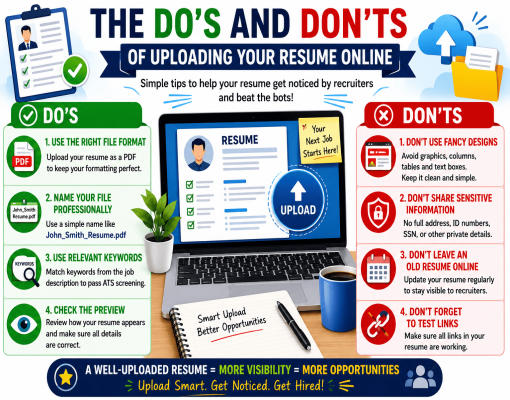
There can be more to a document than the words that can be seen on the screen. For instance, properties of a document might include author names, editing information, or other metadata.
Here are some top tips for uploading your resume:
These quick tips will keep your online applications organized and private.
Job hunting isn't always done at home. Candidates may use computers in libraries, educational institutions, workplaces or internet facilities in public places.
Be mindful of the security of the device and network when uploading your resume.
Follow these precautions:
If you are using a public device, make sure that there is no evidence of your files and login details left behind.
Keep in mind, a secure website won't be able to secure the information if the device you're utilizing is compromised.
One good way to do this is to create different versions of your resume for different purposes.
For example, if you are applying for a marketing job, you will want to highlight your experience in digital marketing. However, if you are applying for an administration job, you may wish to highlight your organizational and communication skills.
This means your information can be tailored to what's relevant.
Consider maintaining:
Do not submit personal information for which the application form has an optional field if the information is sensitive.
A focused resume communicates your value without having to disclose unnecessary details about yourself.
Uploading your resume should not be treated as a one-time activity. Information on your resume or professional profile might need to be regularly updated as your skills and career objectives evolve.
An old profile may have outdated contact details, old employment history, or details that you no longer wish to make visible.
Regularly check your online profile.
Check the following:
Routine audits and reviews help ensure that you have a proper professional identity and control over the information you share.
Sometimes, even when taking care with your personal information, it can be exposed or misused.
If you have been notified that your resume or personal information has been used without your permission, consider taking appropriate action.
You can also report cybercrime concerns related to identity theft or online fraud.
Acting quickly can minimize the risk of further unauthorized sharing of your information.
Before applying for a job online through a job site, check your resume and account with this checklist in mind.
This can help you keep your job search secure and organized.
It's safe to upload a resume to a reputable job site that has defined privacy policies and security protocols in place. But there is no online site which can assure 100% security. Check the privacy policy and do not include too much personal, sensitive information.
Do not provide bank account information, passwords, national identification numbers, passport information and unnecessary family or financial information. Your resume should include information about your professional skills, experience, education and contact details.
This depends on the privacy and publishing settings of the job portal. There are platforms that enable employers to see resumes they have shared with them, and there are also platforms that have searchable candidate profiles. Always ensure that you check the settings on the site.
Keep your CV updated with new experience gained, new skills learned or new goals set. You can regularly check this to ensure your information is up to date.
Be cautious. Payment requests in return for employment, interviews or selection can be a sign of recruitment fraud. Verify the employer independently, and never provide financial details or make payments without verifying the employer's authenticity.
Upload your resume and discover new career opportunities. When doing so, be mindful of your personal information. Upload your resume on trusted job portals and do not give unnecessary details. Ensure your resume has the correct privacy settings. Your resume should showcase your professional skills while keeping your personal information private. Stay informed, be selective with what you share and take confident steps towards your next career opportunity with RoleLinker.com.
© 2026 RoleLinker is Proudly Maintained by Panacea Softwares